
Managing accounting in a business is very important to run smoothly, and QuickBooks Online is the best tool for it. This platform manages financial tracking, bookkeeping, and reporting, and automates these processes. This tool allows you to grant direct authorisation to your accountant. There is a strong security and workflow system that works behind this process. If you run a business, then it is necessary to know how to grant Accountant Access. So in this blog, we are discussing the process of Grant Accountant Access to QuickBooks Online with its reasons, benefits, security tips, and more in detail.
What is Accountant Access in QuickBooks Online?
QuickBooks Online provides a multi-user environment where you need permission to do something for security reasons. It is specially designed to manage accounts, and it has an option to add an Accountant. After adding, it was necessary to give the Accountant User Access. This access option defines a special permission, which is designed for professional accountants, bookkeepers, or CPAs. This is a “read and edit” type of role where an accountant can access every tool on their dashboard, which they need for accounting and compliance tasks.
If you think about the difference between a normal user and an Accountant user access, then a normal user can create invoices and add transactions, but an accountant user can work on adjusting journal entries, reconciliations, audits, reports, and many more things. With the help of accountant access in QuickBooks Online, an accountant can identify every mistake and keep the books clean.
Reason to Grant Accountant Access to QuickBooks Online
Accounting is the challenging part of a business. To reduce accounting issues, if a business owner hires an accountant to manage their account, then that is a smart decision for business growth. To manage accounting, you need to give the permissions to access your business account. There are some reasons to grant accountant access to QuickBooks Online.
- Easy Tax Filing: Every business has to file its annual taxes. If an accountant has permission to access an account, then they can analyze all the transactions and prepare accurate tax filings.
- Save Time and Effort: QuickBooks eliminates all the manual work and automates most of the tasks. So with the accountant access, they can take care of everything through the system themselves.
- Real-Time Collaboration: With QuickBooks Online, both the accountant and admin can work together at the same time in the platform.
- Better Accuracy: After granting access, accountants have a special dashboard that highlights the errors. So that they can easily find duplicate entries, missing transactions, and mismatched reconciliations.
- Security Advantage: After adding an accountant in QuickBooks Online, they can first create their login ID to access the account. So that you do not need to share your login details with your accountant.
Process to Grant Accountant Access to QuickBooks Online
Now, come to the process of Granting Accountant Access to QuickBooks Online. These are the important things that you should know to give permission for accountant access.
- Log in to QuickBooks Online with admin credentials.
- Select Manage Users from the settings.
- There, you can see the Accounting Firms section inside the Manage Users; here, you can manage accountant users.
- Click on “Invite Accountant” and enter a valid email address of an accountant.
- After that, click on Send Invite. Now, the accountant gets the mail.
- When an accountant accepts the invitation, a separate secure login will be created for them. And they can access your company file.
- There, you can add only two accountants in QuickBooks Online for free to manage accounts.
Security Concerns and Solutions
Data security is the priority for every business. When you give access to an accountant, some concerns arise. like
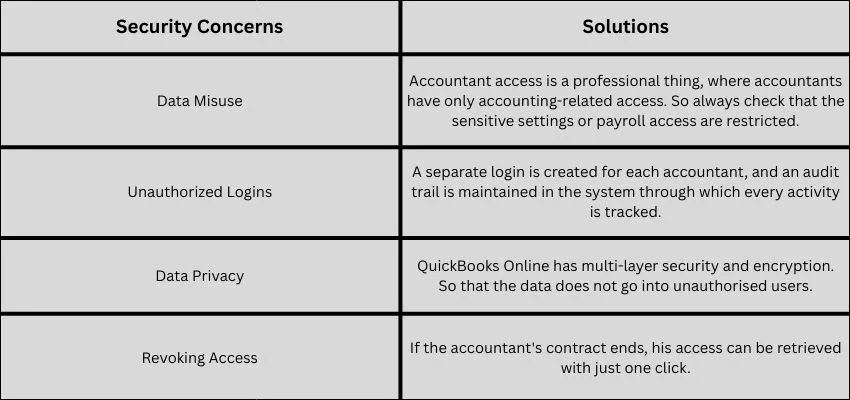
Benefits of Grant Accountant Access to QuickBooks Online
If someone permits their employee to access their important or secure place, then that is only for the benefit of the business. Like that, with Grant Accountant Access to QuickBooks Online, you can get many benefits.
- Smooth Year-End Closing
- Better Financial Reporting
- Improved Cash Flow Management
- Audit Ready Records
- Clean Errors in Books
- Peace of Mind for Business Owners
Common Mistakes to Avoid
Some common mistakes should be avoided while providing access to an Accountant in QuickBooks Online.
- Share your login details: Never share your admin ID and password with your accountant. Always send the invitation separately.
- Don’t check the access regularly: Check every few times who is accessing your system, and also don’t forget to remove the inactive users.
- Provide access to an unauthorised accountant: Give access only to certified and trusted accounting professionals.
- Ignore the security setting: Always keep two-factor authentication enabled.
Conclusion
QuickBooks Online has a powerful platform where every accounting issue is solved using modern technology, which is one of the best tools for fast business growth. It does not compromise with their security and provides a unique and secure environment for accountants to make their work easy, and also secures the admin details. With Grant Accountant Access to QuickBooks Online, you can relax your mind, and the accounting and tax filing become effortless. So if you have any problem, then immediately contact QuickBooks Experts for an Instant solution.