
A large number of businesses use QuickBooks for their financial management because it is the best accounting software for small business in the market. Quickbooks software provide tool so that users can work with ease. This software is great for those users who don’t have technical skills, and it can be used for bookkeeping. One of the best things that QuickBooks provides is QuickBooks cloud hosting. You don’t need to download and maintain a traditional QuickBooks desktop, such as QuickBooks pro, and enterprise in physical computer. With Quickbooks cloud hosting user get several benefits and can do financial tasks from anywhere.
You will get an idea about what QuickBooks cloud hosting is, QuickBooks hosting pricing, providers, and the role of QuickBooks cloud hosting in business all other information in this blog.
What is QuickBooks Cloud Hosting?
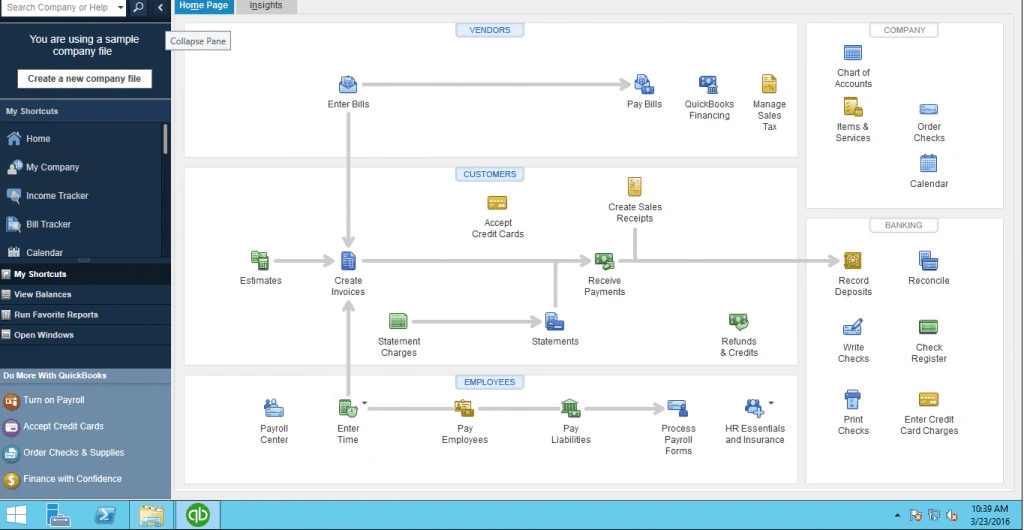
In the starting if a user wants to use QuickBooks, then they need to buy the license and Download QuickBooks Desktop. Then they install QB desktop and set it up in the system. With the Quickbooks desktop, users are restricted to accessing only the company files from the system. If they want to use QuickBooks, they have to sit in front of the system in which QuickBooks is installed, and then they can only work on it.
Now, with the help of Quickbooks cloud hosting application, this problem is solved by installing the Quickbooks desktop on a third-party cloud hosting service. This means that users have to install QuickBooks Desktop on a hosting server instead of a physical desktop. If you are using Quickbooks cloud hosting, then you can access the QB desktop software and company files from anywhere and anytime. The only thing you need is a computer and a good internet connection.
QuickBooks cloud hosting provides several desktop experiences with benefits such as better security, automatic backup, real-time collaboration, and easy scalability.
Modes of QuickBooks Hosting
Quickbooks desktop hosting can be implemented in some modes. Below are the 3 modes you can check.
Dedicated Hosting: In dedicated hosting, a server is dedicated to one business. With this, multiple users can work at the same time. This is helpful for those businesses in which users can work on the same task at the same time.
Peer-to-Peer Hosting: This is on-premise local network hosting in which one user hosts the application and data to provide access to other users on the network. You can select this mode for on premise hosting.
Workaround Hosting Setup: In this process mode of hosting, one user is connected to the hosting server over the internet. That connected user is the main user. The remaining user connected to the main user to access the application on the local network. The main user provides the connection to all other user and they are all connected to the main user.
How QuickBooks Cloud Hosting Works
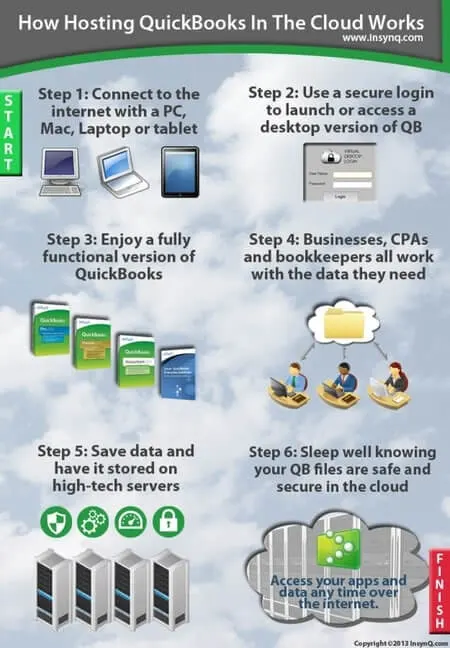
Quickbooks cloud hosting works more simply than the traditional Quickbooks. Because this software is installed on the local desktop, QB is not accessible through that system. Quickbooks cloud hosting works when you install your QuickBooks desktop software on a secure remote server. This is managed by any third-party providers. This allows you to access your company files, data, and applications on the internet from any device. You can access it from a PC, a Mac, a tablet, and other devices.
QuickBooks cloud hosting works on the Remote Desktop Protocol (RDP) by using a web browser. Graphical interface, functionalities, and features of QuickBooks on QuickBooks cloud hosting are similar as real QuickBooks desktop version. You can install any version of QuickBooks desktop, such as QuickBooks Pro, QuickBooks Premier, QuickBooks Enterprise, QuickBooks POS, or QuickBooks Accountant on the Quickbooks cloud hosting. quickbooks hosting pricing will be different from each other and depend on factors like the number of usage, package. Only the administrator has the authority to add/remove user and the admin can also deny some permission of the user. Only the admin has full control of the server. Admin can use the administrative login details and log in as an admin in Quickbooks hosting.
With a good internet connection, you can access QuickBooks from anywhere and anytime. The second thing is a remote access tool or a web browser installed on the desktop. For using the QuickBooks Multi-users, every user needs a separate system.When working on QuickBooks Cloud, all the data and company files are securely saved on the hosting server. Even when the local system on which you were working, all the accounting data will remain safe on the hosting server.
Here are the steps on how QuickBooks cloud hosting works.
- On the server of a hosting service provider licensed version of QB is installed.
- With the multiple configuration options user gives authorized access to the server over the internet.
- For the protection of the application and data, some strong security measures are implemented.
- Connectivity between the user’s device and the server is established through the Remote Desktop Protocol (RDP).
- The server is configured to work with Windows-based systems. It can also be accessed from any device, such as a desktop, laptop, tablet, or smartphone.
- The user can run Quickbooks with the help of a browser such as Chrome, Internet Explorer, Firefox, or through RDP.
- Any updates or changes made on hosted QuickBooks are automatically saved. It will be immediately available to all authorized users.
Benefits of QuickBooks Cloud Hosting
There are several benefits of QuickBooks cloud hosting. Below are the benefits.
- The user can log in to QuickBooks at any time from anywhere without any restrictions.
- For the team collaborations, Quickbooks multi user feature is more effective.
- QuickBooks cloud hosting protects all QuickBooks user data and securely on the remote hosting server.
- With this you can switch and upgrade to a new device without losing access to your data in QuickBooks.
- Stored data on the hosting server is automatically backed up, ensuring your data will be secure.
Most of the cloud hosting offers to deliver improved performance and flexibility. In addition, it allows websites to increase the capacity and support load balancing across multiple server environments. It reduces the single strain on the server and puts a bit of pressure on the resources of a single server. The speed of the website is also affected by the quality of the server hardware. If you are choosing a cloud hosting service provider, so they offers advanced caching techniques, high-performance hardware, and low server density. These things can enhance overall site performance.
In the previous cloud server were complex because you must have strong technical expertise to manage. Today, with modern cloud hosting, you will get a user-friendly dashboard. It allow user to track usage and manage hosting needs without requiring a technical background. Traditional hosting places a website on the server and creates a single point of failure. On the other hand, cloud hosting uses redundancy and a failover system. By shifting traffic to other active servers then website remains available.
QuickBooks Desktop Enterprise Cloud Access Packages
QuickBooks Desktop Enterprise is available for users with cloud hosting and you have the option to choose the right packages which are suitable to your budgets and requirements that fulfill the need of your business. It is available in three packages that are Core, Classic, and Delux with their different features. Here, we’ll discuss all these packages with their features so that you can decide which one is better for you.
Core
You can easily access the core package from your quickbook Enterprise from anywhere and easily get the full functionality of the QuickBooks desktop version. This functionality is not available in QuickBooks Online. If you take this plan, you have a 5 gb storage space that will work smoothly and be integrated with the Microsoft Office suite.
Classic
This Classic package is one of the most popular packages, they offer various features and affordability. You can easily select different apps that can be integrated with the quickbooks also manage the billing part and expenses. These features are available in 10 Gb storage space, and this package is integrated with the Microsoft Office suite as well as Google Chrome.
Deluxe
When the features of the core and classic packages are available in one packages that known as the deluxe package. It’s offer among advanced capabilities and support a integration of 200 applications. You can use the 50 gb storage space with the help of the deluxe package and make your business well-suited, and use an extensive app with connectivity for larger data.
What is the Impact of QuickBooks Cloud Hosting Services?
Reduce Manpower: This program of QuickBooks Hosting is really helpful because it reduces manpower and resolves the accounting money issue within a few minutes. The hosting of QuickBooks gives permission to the user to find the solution for desktop and mobile devices as well.
Manage Accounts: The business owner really aspires to the process of hosting QuickBooks and help with cloud hosting. Its help to make the important decision of the accounts. QuickBook cloud hosting helps to access your accounting files remotely from anywhere and anytime. So you dont have to send a file anymore through email. And you can access the account from any device
Resolve accounting problem: Hosting service of quickbooks help business owners to understand the transaction process under a particular account. Hosting service and cloud services both compete in the business world.
In this environment, hosting services provide a deal with the right programmable option. You can use a hosting service so you can access your details anywhere in the world.
Is QuickBooks hosting beneficial? What Importance of QuickBooks Hosting for business? Here we discuss some of the major benefits you get with QuickBooks cloud hosting.
Why Choose QuickBooks Hosting for Your Business
Many businessmen do not have enough knowledge about QuickBooks. We will discuss the reason behind the importance given by businessmen to QuickBooks cloud hosting.
- Multi-user collaboration: QuickBooks hosting gives you the benefit of access to multiple users at the same time. This helps in team collaboration as a business employee and a CPA can view, collaborate on teamwork and work on the company files in real time. In this process all the people work together on the same server without any interruptions.
- Easy access: With the QuickBooks hosting both the accountant and accounting firms get the freedom to access their QuickBooks data from anywhere. With the help of QuickBooks cloud hosting, you can easily update your data file just by having a device and a good internet connection. You can remotely access the supported desktop version of QuickBooks with just a web browser and connect with multiple office locations.
- No Data Storage Limit: As you all know that the storage space grows with your data and these hosting accounts provide you with unlimited data storage. So you do not have to worry about the storage tension. This also includes all the QuickBooks Desktop Pro, Premier and the QuickBooks Enterprise files.
Customer friendly: QuickBooks hosting provides you with a user friendly interface and even smaller companies can also improve efficiency when users can work at the same time. - Good server connectivity: If you have a business partner and you want to work together with him, but you are not together at the same city or place. Then the QuickBooks cloud platform helps you to share the details. When particular information is hosted under a particular cloud, everyone can view it and it is easier to access than bookmarking the one you need to know.
- Data security: Keeping your sensitive financial data is not safe. Quickbookjs also provides you with this solution of keeping your important data away from hackers. That’s why having the best QuickBooks app is important.
- Backup protection: QuickBooks Hosting providers offer an automatic backup service which helps in maintaining your accounting data secure. After that you do not have to worry about losing your unimportant financial data.
- Integration with tools: QuickBooks offers you numerous tools that integrate with your existing system which are trustworthy. This helps you by providing shortcuts and strategies to streamline accounting processes. This is the reason behind the increased user work performance and satisfaction.
How to Choose Cloud Hosting Provider for QuickBooks
There are many third-party cloud hosting providers available and you have the freedom to choose any cloud hosting provider for QuickBooks. But, we recommend you choose any one of Intuit’s Authorized Hosting providers for QuickBooks.
Below mentioned are some factors that you should consider before selecting a hosting provider.
- For high performance and security hosting providers operate modern, state-of-the-art IT infrastructure and data centers.
- 24/7 reliable technical support or customer support available to resolve problems anytime.
- Cloud hosting must be compatible with all version of QuickBooks
- The server uptime should be more than 99% guaranteed.
Difference Between QuickBooks Online and QuickBooks On Cloud
Many users get confused with QuickBooks Online and QuickBooks Cloud Hosting workings because both the software are designed and developed by Intuit and like QB on Cloud, in QBO users can access the software from any system they want but there is a difference between them.
Below we’ve separately discussed how QuickBooks Online is different from QuickBooks Cloud.
QuickBooks Online
As we know QBO is a web-based application which means users can access it from any system if they have an internet connection but note that QuickBooks Online is a completely different database.
Unlike QuickBooks Desktop, QBO has a monthly subscription fee with an additional Intuit Payroll fee. If you ever want to export data from QuickBooks Desktop to QuickBooks Online then you may have to face some issues and data transfer is not ever 100% accurate. It has been mentioned by many QuickBooks Desktop users who recently switched to QuickBooks Online that QBO is relatively slow in processing than QBD and also lacks some features of QuickBooks Desktop.
You need a browser for access to QuickBooks Online because it is a web application that can be accessed from any device. So, you need a high-speed internet connection which is the main issue that arises during the use of QuickBooks online.
QuickBooks Online is available for users with multiple plan options that are cost-effective as well as meet the requirements of the users so it is in very much demand.
Unlike QuickBooks desktop, you don’t need to upgrade the QuickBooks online every year due to it being designed on a web-based application.
QuickBooks Cloud Hosting
Hosting QuickBooks Desktop on the cloud is one of the best options for those users who want to use the QuickBooks web application with the power of QuickBooks Desktop. QuickBooks Cloud is proven to be game-changing for those businesses where many users need to work on the same company file at the same time which cannot be possible with QuickBooks Online. Cloud hosting gives the option to store all the data on the remote server so, you can access your QuickBooks Desktop from anywhere and anytime.
Cloud Hosting gives you the complete functionality that can be used in the QuickBooks Desktop which improves the efficiency of the business and performance because in QuickBooks online you can limit to all the functionality.
You can any version of QuickBooks Desktop i.e. Pro, Premier, POS, or Enterprise on the hosting server to access it from anywhere. If you installed QuickBooks Enterprise on the cloud hosting server then up to 30 users will be able to use company files simultaneously.
Features like reporting and tracking which are only available in the QuickBooks Desktop version can be used via QuickBooks Cloud. These features are not available in QuickBooks Online.
We hope that now you’ve learned everything about how QuickBooks on the cloud works and in which ways it will be proven beneficial for your business. We’ve also discussed how QuickBooks Cloud hosting is different from QuickBooks Online.
If you want to know more about QuickBooks accounting software or if you have facing any issues then you can have assistance from our team of certified QuickBooks ProAdvisors. Call us on +1-844-405-0904 24/7 toll-free number to get in touch with our professionals.